

Urgent Marketing Collateral for Events: A 2026 Guide
Table of Contents
The Last-Minute Event Collateral Playbook
What You Can Realistically Produce in 24 Hours
The Production Timeline That Actually Works
Same-Day Event Banner Printing: What to Know Before You Order
Materials and Sizes That Hold Up Under Deadline Pressure
Last-Minute Trade Show Materials: A Priority Checklist
Custom Event Signage Turnaround Time: Realistic Expectations
Print Marketing Materials That Ship Fast: Flyers, Postcards, and Brochures
Digital and Social Media Assets: The Zero-Wait Complement
The Parallel Workflow That Saves Hours
Where Digital Covers Print's Gaps
QR Codes, Sustainability, and Budget: Three Angles Most Guides Skip
QR Code Integration and Tracking: Turn Print Into Data
Sustainability and Eco-Friendly Materials: What Is Actually Available
Budget-Friendly DIY Versus Professional Outsourcing: A Decision Rule
Frequently Asked Questions
Last Updated: September 20, 2026
The Last-Minute Event Collateral Playbook
Urgent marketing collateral for events is any printed or digital asset you need before a hard deadline, usually within 24 to 72 hours. Most of it is doable, the catch is knowing what to order first and what to skip. At Full Color Business Cards and Flyers in 1 Day, we handle same-day and next-day printing across Sacramento, San Francisco, and San Jose.
Key Takeaway The order in which you place your print jobs matters more than the speed of any single job. Signage and banners first, small handouts last.
What You Can Realistically Produce in 24 Hours
Banners, yard signs, posters, flyers, and business cards are realistic same-day or next-day items. Custom apparel and complex multi-page brochures usually need more time.
Same day or next day: banners, yard signs, posters, flyers, business cards
Next day, with limits: door hangers, simple direct mail pieces
Plan ahead: custom apparel, multi-page brochures, specialty finishes
The Production Timeline That Actually Works
Working backward from your event date is the only timeline that holds up. Start with your event start time, then subtract each production and pickup window. Here is a practical 48-hour sequence:
Hour 0-2: Confirm final copy and dimensions for every piece
Hour 2-4: Submit banner and signage orders first
Hour 4-6: Submit flyers, posters, and cards
Hour 6-24: Proof everything, approve, and schedule pickup or delivery
Hour 24-48: Pick up, pack, and do a final count
Watch Out Skipping the proof step to save an hour is the single most common last-minute mistake. A typo on a banner means a full reprint, and a reprint eats the exact hours you don't have.
Same-Day Event Banner Printing: What to Know Before You Order
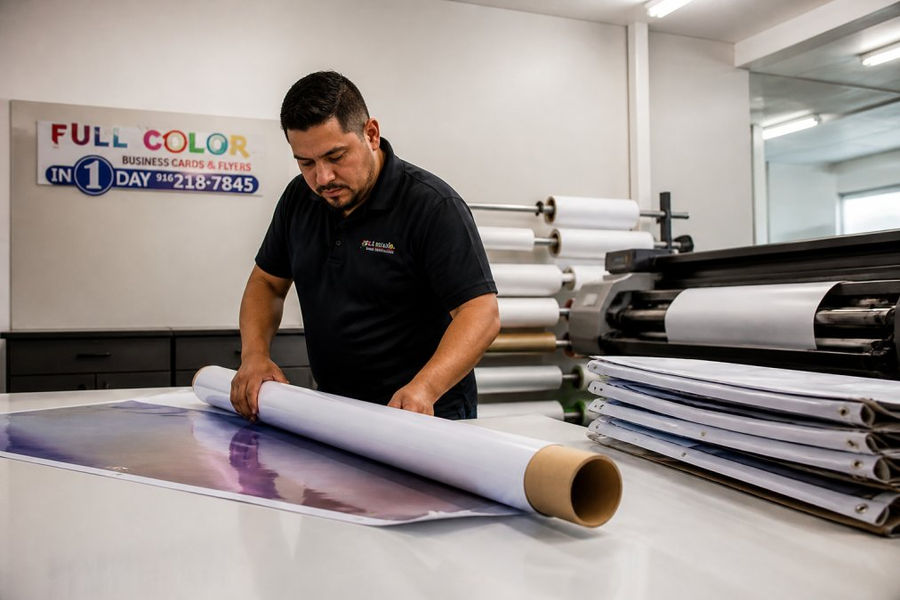
Same-day event banner printing depends on three things: material, size, and file readiness. Get all three right and a banner prints and finishes within hours.
Materials and Sizes That Hold Up Under Deadline Pressure
Pick your material based on where the banner will hang, not what looks best in a photo. Indoor banners can be lighter and cheaper; outdoor banners need weight and wind relief:
Indoor, one day: 13-ounce vinyl, grommets on all corners
Outdoor, short term: heavier vinyl with reinforced edges
Windy or open areas: mesh banner to let air pass through
Reusable, multi-event: heavier vinyl with a hemmed edge
Last-Minute Trade Show Materials: A Priority Checklist
Last-minute trade show materials follow one rule: cover the booth first, then the handouts. A bare booth loses attention before a single flyer gets handed out.
Build your checklist in this order:
Backwall or booth banner with your logo and main message
Table cover or runner with your brand colors
One clear sign with your offer or call to action
Business cards for every staffer
Flyers or one-pagers for the table
QR code sign linking to your site or booking page
Custom Event Signage Turnaround Time: Realistic Expectations
Custom event signage turnaround time ranges from a few hours to several days. Simple yard signs and posters sit at the fast end; complex shaped signs and mounted displays at the slow end:
Signage Type | Typical Turnaround | Best For |
Yard signs | Same day to next day | Outdoor promos, directions |
Posters | Same day to next day | Indoor displays, windows |
Vinyl banners | Same day to next day | Booths, backdrops, fences |
Rigid mounted signs | 1-2 days | Entrances, photo backdrops |
Custom shaped signs | 2+ days | Feature displays, stage pieces |
Print Marketing Materials That Ship Fast: Flyers, Postcards, and Brochures
Flyers, postcards, and single-fold brochures are the fastest print marketing materials to produce: high volume, little finishing, easy to reprint if you run short.
A few practical tips:
Order flyers in round numbers so you have spares
Keep one clear call to action per piece
Use the same headline across all materials for brand consistency
Ask about flexible packages you can split across sizes
Pro Tip Print a small first batch to check color and sharpness, then run the full quantity. Many print shops can release a partial run early so you have something in hand while the rest finishes.
Digital and Social Media Assets: The Zero-Wait Complement
Digital and social media assets carry zero production time, making them the perfect partner for urgent print work. While your banner prints, digital pieces can go live within the hour, but only if files are already sized and named correctly. Treat digital as a parallel track, not an afterthought. Here is the asset list worth building first, with the specs that matter:
Feed graphics: 1080 x 1080 px square for Instagram and Facebook feeds; 1080 x 1350 px for the taller 4:5 slot that takes more vertical screen space
Story and Reel covers: 1080 x 1920 px vertical, keeping text inside the middle safe zone so platform UI does not crop your headline
Event header for Facebook: 1200 x 628 px, the same ratio that works for most link previews
Email header: 600 px wide is the safe standard across major email clients
Landing page hero: 1920 x 1080 px, compressed under roughly 200 KB so mobile attendees are not waiting on a slow load
The Parallel Workflow That Saves Hours
Run digital and print at the same time, not in sequence. A workable 48-hour split:
Hour 0-1: Lock the headline, offer, and call to action. Every asset, print or digital, uses the same three lines.
Hour 1-3: Build the digital set while the print files go to the shop. Digital does not wait on a proof.
Hour 3-6: Schedule social posts and the email send. Scheduling beats posting live because you are not glued to a phone during setup.
Hour 6-24: Let print proofs run their course. Digital is already out the door.
Where Digital Covers Print's Gaps
A digital event schedule can change the day before if a speaker drops. A printed schedule cannot.
Email reminders sent 24 hours and 2 hours before doors open consistently pull more walk-ins than a single send.
Social countdown posts build momentum in the final day, when print is already at the shop and out of your hands.
A QR code on every print piece links a static handout to a live landing page you can still edit.
Pro Tip Name your files with the platform and dimensions in the filename (for example, `event-feed-1080x1080.png`). When you are uploading six assets at midnight, clear filenames save more time than any design tweak.
Keep a single shared folder with the final approved headline, logo files, and brand colors. Every asset pulls from that folder, so a last-minute change means updating one place.
QR Codes, Sustainability, and Budget: Three Angles Most Guides Skip
Most guides ignore three things that matter: QR code tracking, eco-friendly materials, and the DIY versus outsourcing call. Each changes how you plan a rushed order.
QR Code Integration and Tracking: Turn Print Into Data
A QR code is only useful if you can see what it did. The setup that produces data takes about ten minutes:
Use one destination per piece, not one for everything. A banner QR code and a flyer QR code should point to different URLs, even if both land on the same page. Add a simple tracking parameter to each (most link shorteners and website builders let you append one) so your analytics can tell you which piece got scanned.
Test the code at the actual print size. A QR code that scans on your monitor can fail on a banner if it is too small or too low-contrast. A common rule is a minimum of about 1 inch square for every 10 feet of scanning distance. A banner read from 20 feet needs a code roughly 2 inches square or larger.
Keep strong contrast. Dark code on a light background scans reliably. Light code on a dark background, or a code placed over a busy photo, is where scans fail.
Add a short call to action next to the code. "Scan for the schedule" or "Scan to book a demo" lifts scan rates far more than a bare code.
Watch Out Do not print a QR code that points to a page still under construction. A scan that lands on a broken page is worse than no code at all, and you cannot fix a printed code after the fact.
Sustainability and Eco-Friendly Materials: What Is Actually Available
Green collateral is no longer niche. The options that matter for a rushed order:
Recycled paper stocks: Many standard flyer and postcard stocks are available with a high recycled content. Ask before you assume it adds lead time; on common sizes it often does not.
Soy-based and vegetable-based inks: Widely used in commercial printing and compatible with fast turnaround on standard jobs.
Reusable banner materials: A heavier vinyl banner with a hemmed edge can be rolled, stored, and used across multiple events. A disposable banner used once is the least sustainable option on the table.
Recyclable rigid signs: Some rigid substrates are recyclable where local programs accept them. Confirm before you promise attendees a recyclable sign.
Budget-Friendly DIY Versus Professional Outsourcing: A Decision Rule
DIY works for digital assets and tiny print runs. It fails for large-format signage and color-critical brand pieces. The trade-off is time versus finish quality, and the deciding factor is almost always size.
Factor | DIY | Professional Outsourcing |
Best for | Digital graphics, small runs | Banners, signs, bulk print |
Speed on large format | Slow, limited size | Fast, same-day options |
Print quality | Home-printer level | Rich, sharp, color-accurate |
Cost at scale | Cheaper for a few pieces | Cheaper per unit at volume |
Design help | None | Semi-custom design support |
Color accuracy | Varies by home printer | Consistent across the run |
A simple decision rule covers most last-minute calls:
If the piece is larger than a standard sheet of paper, outsource it. Home printers cannot produce a banner, and a taped-together poster reads as unprofessional from across a room.
If the color has to match your brand exactly, outsource it. Home printers drift on brand colors, and a logo that looks off undermines every other piece.
If you need more than a few dozen copies, outsource it. The per-unit cost drops fast at volume, and your time is better spent on the event itself.
If it is a digital graphic or a handful of handouts, DIY is fine.
Best For Startups and small teams facing a hard event deadline who need banners, signs, and cards produced in a day without a big budget.
Frequently Asked Questions
What are the most essential marketing materials for a last-minute event?
Focus on items that do the most work with the least lead time: event signage, banners, flyers, and business cards. These cover wayfinding, promotion, and networking. If you have 24 hours, prioritize a large-format banner for visibility and a short-run flyer for handouts. Business cards and door hangers can usually be added if your printer offers same-day options. Skip anything with complex die-cutting or specialty finishes, which add days to production.
How can businesses ensure high-quality print results with tight deadlines?
Submit print-ready files with correct bleed, safe margins, and CMYK color mode. Include all fonts or convert them to outlines. For same-day event banner printing, use vector files for logos and 150 dpi minimum for photos at final size. Confirm the exact dimensions before uploading. If design help is needed, choose a printer that offers semi-custom design services so your file is production-ready before the press starts. A quick proof review, even a digital one, prevents costly reprints.
What types of event collateral can be produced in 24 hours or less?
Standard items with fast turnaround include business cards, flyers, brochures, posters, door hangers, yard signs, and vinyl banners. Digital assets like social graphics and email headers can be created instantly. Custom apparel and complex signage often need more time, so confirm availability before promising them. For custom event signage turnaround time, ask specifically about material and size, since a 24x36-inch yard sign and a 10-foot banner may follow different production schedules.
What are the best practices for preparing files for urgent print jobs?
Build your file at final size with 0.125-inch bleed on all sides and keep critical text inside a 0.25-inch safe zone. Use CMYK, embed or outline fonts, and flatten transparencies. Export as a high-resolution PDF. Name the file clearly with your order number and event date. If you are not a designer, use a printer that offers design support so they can fix technical issues quickly. Double-check spelling and phone numbers, because urgent jobs leave no room for a second proof cycle.
See Pricing Today


Comments